여러분 안녕하세요!
토미입니다.
You must be curious about the results after taking the Test of Proficiency in Korean (TOPIK.)
※Henceforth, the Test of Proficiency in Korean is read as TOPIK.
“What score could I get?”
“Which grade did I pass?”
You’ll be restless until the results are out, won’t you?!
In this page, I will guide you on how to check your results of TOPIK and how to read the score report.
Actually, there have been some updates on how to check your results online.
You can learn about the latest ways to check your test results in this article.
By reading this article to the end, you will be able to check your TOPIK results accurately and faster than anyone else!
그럼 시작할게요!
Ways to Check the Results
The TOPIK results are announced about a month after the test date.
If you check it online, you can access the website on either a computer or a smartphone.
※The results appear on a smartphone about ten days later than on a computer.
Since the detailed results and score report can only be viewed and printed on a computer, I recommend checking your results using the PC.
When Checking the Results on the Computer
First, go to the ‘Check your Score’ page on the official TOPIK website in Korea.
Then, you will see the ‘성적확인 (Check your Score)’ page.
If a pop-up appears, click ‘닫기 (Close)’ to close it.
Since the internet is usually congested on the announcement day of the test results, you might not be able to reach the page right away.
In that case, the page below will appear (This screen indicates that more than 10,000 people are waiting💦).
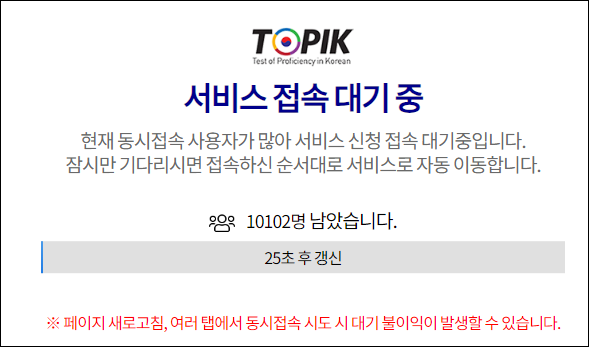
I usually have to wait 20 to 30 minutes each time.
If you don’t want to wait for a long time, you should check it the next day.
If the page that appears is not the ‘성적확인 (Check Your Score)’ page, click on ‘성적확인 (Check Your Score)’ at the top left.
 Enter your test information and personal details on the page..
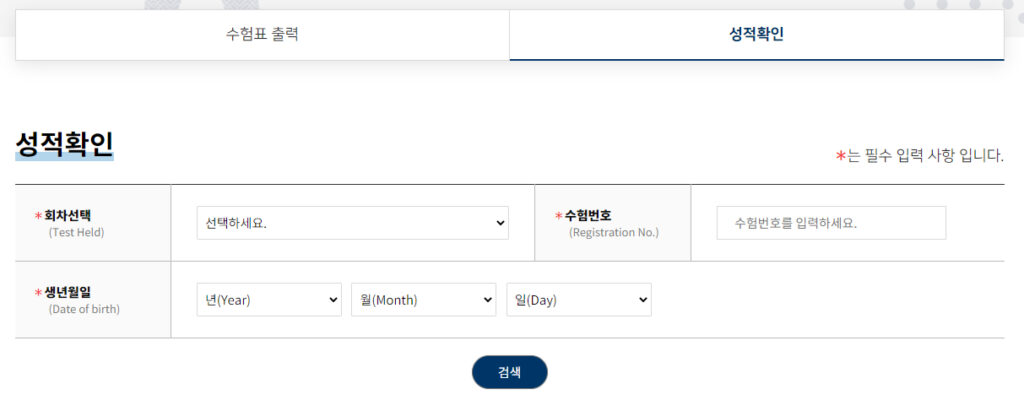
For the ‘회차선택(Test Held)’ on the left, select the test you took from the drop-down list.
For the ‘수험번호(Registration No.)’ on the right, enter your examinee number directly.
After that, enter your ‘생년월일(Date of birth)’ by selecting the numbers from the drop-down list.
Make sure that the information you enter on the page is correct.
Finally, click ‘검색 (Search)’ and your test results will appear.
Simple Ways to Check Your Results
If all the information is correct, your test results will be displayed below the ‘검색 (Search)’ button.

・합격여부(Acceptance) indicates whether you passed the test or not.
‘합격’ ➡︎ ‘Passed’
‘불합격’ ➡︎ ‘Failed’
・‘총점 (Total Score)’ refers to your combined score in 듣기 (Listening,) 쓰기 (Writing,) and 읽기 (Reading.) You can determine your grade based on the 총점 (Total Score.)
・‘평균 (Average)’ shows the average score of 듣기(Listening,) 쓰기(Writing,) and 읽기(Reading) among all examinees.
・‘유효기간 (Certificate Validity)’ refers to the validity period of the test. It is valid for two years.
・‘출력기간 (Output Period)’ refers to the period during which the certificate can be printed. The certificate can be printed until the specified date (up to two years.)
※Once the certificate’s validity expires, you will no longer be able to view the results.
When you click the ‘출력 (Output)’ button, the detailed results will appear.
Detailed Ways to Check Your Results

・‘등급(Level)’ on the right indicates your grade.
If you do not pass any level, ‘불합격 (Failed)’ will be shown in the box.
Let’s take a look at the other columns from the left.
・‘영역 (Section)’ is divided into ‘듣기 (Listening),’ ‘쓰기 (Writing),’ and ‘읽기 (Reading).’
・‘점수 (Score)’ indicates your score in each section.
・‘시험점수 및 수험집단평균 (your score and average)’ shows the scores for each section of the test. The top row represents your scores, and the bottom row shows the average scores of all examinees.
Also, the ‘언어 수행 능력(Level Description)’ column under the result chart describes the Korean language abilities that successful examinees possess.
You can print it yourself, and the sheet can be used as the official transcript of the Test of Proficiency in Korean.
If you don’t have time to submit your TOPIK transcript, the official website is very useful.
So far, I have covered the following topics: ‘How to Confirm Your Results of TOPIK’ and ‘How to Read Your Score Report.’
You might feel worried when checking your results on the Korean website by yourself, especially if it’s your first time taking the test or if it’s been a while.
However, you can easily check your results online as explained here, which is faster than waiting for it to arrive by mail.
I hope this will help you when you check your TOPIK results.
그럼 오늘도 행복 가득, 웃음 가득한 하루 되세요!
한국어 화이팅, 화이팅, 화이팅!!